When a project grows to include multiple environments (dev, staging, production) and multiple team members, manual deployment is no longer suitable. At this stage, CI/CD becomes the protective layer that standardizes and secures the smart contract release process.
In practice, manual deployment carries many risks: forgetting to verify, deploying to the wrong network, using incorrect configurations, and more. A CI/CD pipeline helps eliminate human errors.
1. High-Level Model
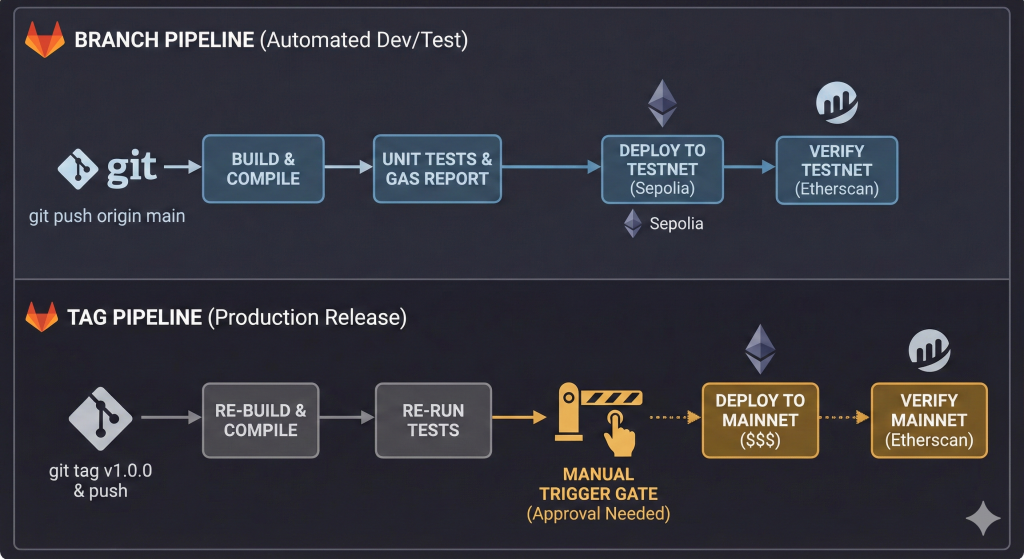
GitLab creates two separate types of pipelines: branch pipelines and tag pipelines. The strategy here is:
- Branch pipeline (push to default branch): build + test + automatic testnet deployment
- Tag pipeline (push tag x.x.x): build + test again + allow manual mainnet deployment
Branch Pipeline
git push origin main
        ↓
 [build]
    ├── compile → artifacts/
    ├── test (parallel)
    └── gas-report (allow_failure)
        ↓
 [deploy-testnet]
    └── deploy-sepolia (auto)
        → deploy + verify on Sepolia
Tag Pipeline
git tag 1.0.0 && git push origin 1.0.0
        ↓
 [build]
    ├── compile
    ├── test
    └── gas-report
        ↓
 [deploy-mainnet] (manual)
    → click “Run” in GitLab UI
    → deploy + verify on Mainnet
Why doesn’t deploy-mainnet depend on deploy-sepolia?
Because they belong to different pipelines. GitLab does not allow jobs in a tag pipeline to depend on jobs from a branch pipeline. Therefore, the tag pipeline runs a full rebuild and retest before allowing mainnet deployment.
2. GitLab CI Pipeline
Create a .gitlab-ci.yml file at the root of the repository.
The pipeline consists of three stages:
- build
- deploy-testnet
- deploy-mainnet
Stage 1 – Build & Test
compile: install dependencies and compile contractstest: run Hardhat testsgas-report: generate gas usage report (allowed to fail)
Artifacts from compilation are stored temporarily for deployment.
Stage 2 – Deploy to Testnet
Triggered automatically when pushing to the default branch.
Steps:
- Deploy to Sepolia
- Extract contract address
- Verify contract on Etherscan
- Store deployment artifacts
Stage 3 – Deploy to Mainnet (Manual)
Triggered only when pushing a version tag matching x.x.x.
- Requires manual approval (
when: manual) - Re-runs compile + test
- Deploys to mainnet
- Verifies contract
- Stores deployment artifacts
Mainnet Deployment Process
1. Merge code into default branch → automatic testnet deployment runs
2. Verify contract behavior on Sepolia
3. Create and push version tag
git tag 1.0.0
git push origin 1.0.0
4. Go to GitLab UI → open tag pipeline → click “Run” on deploy-mainnet
3. Security in CI/CD
Important considerations:
- Store private keys in GitLab CI/CD Variables (Masked + Protected enabled). Never hardcode.
- Mark sensitive variables as Protected so they are only injected into protected branches or tags.
when: manualon mainnet deploy adds an additional confirmation layer.- Consider using a multi-sig wallet (e.g., Gnosis Safe) as contract owner instead of a single EOA.
- Use separate private keys for testnet and mainnet.